Upload Word Documents
Step 1: Sign in to www.editoutloud.com from your computer.
Use the same credentials that you use to sign in to the mobile app.
Step 2: Upload your document
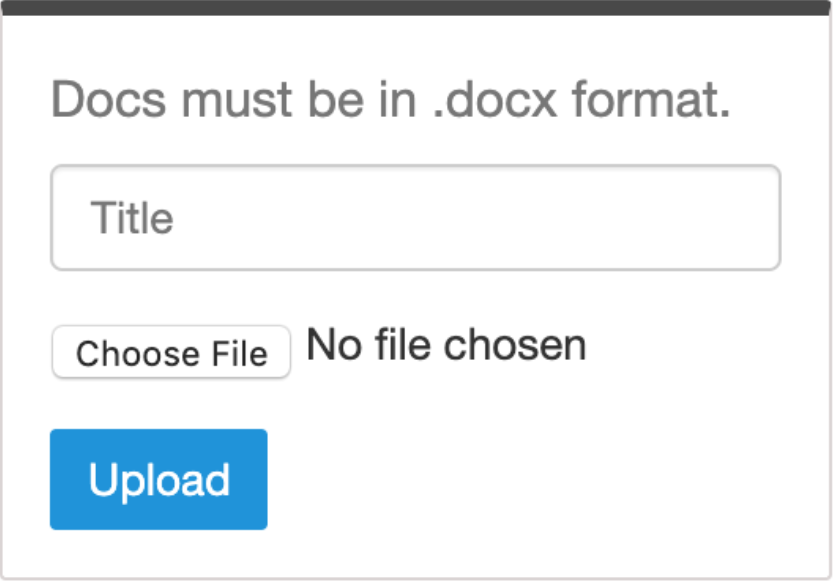
Click "My Documents" in the top menu to find the upload form pictured below.
Click "Choose File" to select a ".docx" Word document from your computer and then click the "Upload" button.
Older ".doc" file types ARE NOT permitted. There are many tools online that can help you convert ".doc" files to ".docx" if needed.
Download ".docx" files with comments
Step 1: Download your ".docx" file from the Edit Out Loud website
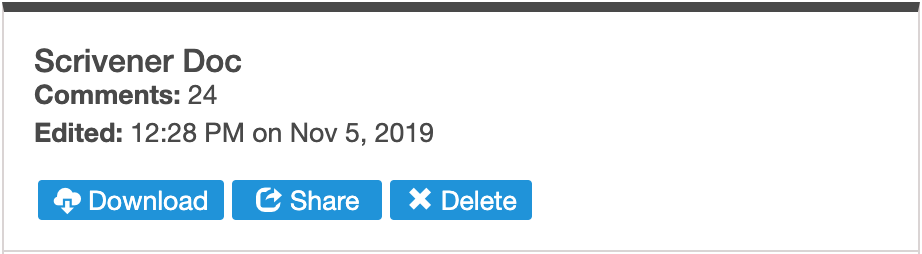
Once you or beta readers have listened to your draft and added comments, you can download a ".docx" file that includes any comments that have been added from the Edit Out Loud mobile app. Simply sign in and visit the "My Documents" section. From there. click the "Download" button.
Use the same credentials that you use to sign in to the mobile app.
Click "My Documents" in the top menu to find the upload form pictured below.
Click "Choose File" to select a ".docx" Word document from your computer and then click the "Upload" button.
Older ".doc" file types ARE NOT permitted. There are many tools online that can help you convert ".doc" files to ".docx" if needed.
Once you or beta readers have listened to your draft and added comments, you can download a ".docx" file that includes any comments that have been added from the Edit Out Loud mobile app. Simply sign in and visit the "My Documents" section. From there. click the "Download" button.